
Resources / Articles / The 30 most common attack surfaces facing small businesses on the Mid North Coast
Cybersecurity for Mid North Coast small businesses

The 30 most common cyber attack surfaces facing small businesses on the Mid North Coast

Small businesses across the Mid North Coast rely on email, cloud platforms, mobile devices, suppliers and online payments to keep work moving. These systems create convenience, but they also create openings criminals can exploit through trust, urgency and familiar business processes.

Your biggest cyber exposure may not be a server, firewall or piece of software. It may be a rushed employee, a convincing phone call, an expected invoice or a trusted supplier asking for one small change.

Modern criminals attack the space where people, technology and business processes meet. They use emotion to create the opening, familiar communication channels to appear legitimate and technical weaknesses to turn one decision into a larger incident.

Trust
Authority
Urgency
Fear
Curiosity
Reward
The human layer Where many business attacks try to create their first opening

Attackers do not need every person to make a mistake. They only need one believable moment.

The business outcome

Good cybersecurity should help people work safely without making every decision difficult.

Business owners want staff to communicate quickly, serve customers, approve payments, share files and solve problems. Security cannot simply tell people to stop trusting, stop clicking or stop making decisions.

The practical goal is to create an environment where suspicious requests are easier to recognise, sensitive actions are independently checked and one human mistake does not automatically become a major business incident.

1
A believable situation is created The attacker imitates a customer, manager, supplier, bank or trusted organisation.
2
Emotion changes the pace Urgency, fear, authority, helpfulness or financial opportunity makes pausing harder.
3
A normal process provides the path Email, payments, recruitment, remote access and cloud systems become the delivery route.
4
A gap increases the impact Missing MFA, excessive access or uncertain backups allow the problem to spread.
Mid North Coast business context

Regional businesses are connected to the same cyber risks as larger organisations.

Small businesses in Coffs Harbour, Port Macquarie, Kempsey, Nambucca Heads, Taree, Forster and surrounding Mid North Coast communities increasingly depend on cloud platforms, online banking, remote access, digital bookings, email and mobile devices.

A business does not need to be a large company or hold millions of customer records to attract criminal attention. It may be targeted because it processes payments, communicates with suppliers, stores personal information or provides a pathway into another organisation.

Regional businesses may also rely on small teams where one employee manages several responsibilities. That can make urgent payment requests, account changes and supplier communications particularly difficult to verify during a busy working day.

01
Small teams carry broad responsibilities One person may manage customers, accounts, payroll, suppliers and technology access.
02
Trusted relationships can reduce caution Familiar suppliers, local contacts and long-standing customers can make impersonation more believable.
03
Cloud services remove geographic boundaries A criminal does not need to be physically near the Mid North Coast to target a local business.
04
Operational disruption can be significant A small team may have fewer people available to manage downtime, recovery and customer communication.
Small business attack surface map

Cyber exposure extends across the whole Mid North Coast business.

An attack surface is any place where a criminal may be able to influence a person, enter a system, steal information, redirect money or interrupt operations. For most small businesses on the Mid North Coast, these surfaces can be grouped into six connected zones.

People and emotion Trust, pressure, authority, helpfulness and fatigue.
Communication Email, phone, SMS, messaging platforms and QR codes.
Identity and access Passwords, MFA, shared accounts and permissions.
Devices and workplace Laptops, mobile devices, remote access and physical entry.
Digital ecosystem Cloud services, suppliers, websites, social media and AI.
Money, data and process Payments, payroll, recruitment, backups and response.
Risk zone 01

People and emotional pressure

In a small Mid North Coast business, employees often know customers, suppliers and managers personally. Criminals exploit that familiarity by creating requests that sound local, expected and believable.

01

Public professional and local business profiles

LinkedIn, company websites, local business directories, community pages, event listings and social media can reveal employee roles, reporting lines, suppliers, projects and travel plans.

Reduce the exposure: Review what staff profiles, business directories and social posts reveal about responsibilities, systems and decision-making authority.
02

Authority and seniority

A request appearing to come from an owner, director, bank or government agency can cause staff to bypass normal checks.

Reduce the exposure: Make verification a required process, not a sign that an employee is being difficult.

03

Urgency and time pressure

“Pay this today”, “your account will be closed” and “I need this before the meeting” are designed to reduce critical thinking.

Reduce the exposure: Treat unexpected urgency as a reason to slow down and verify through another channel.

04

Helpfulness and customer service

Employees are trained to solve problems. A convincing caller may exploit that instinct by asking for a reset, document or policy exception.

Reduce the exposure: Give staff clear boundaries for what can be shared, changed or approved.

05

Fatigue, distraction and routine

A familiar-looking request arriving during payroll, month-end, tax time or a busy service period may succeed because the employee is moving quickly.

Reduce the exposure: Add deliberate checks around high-risk tasks during predictable pressure periods.

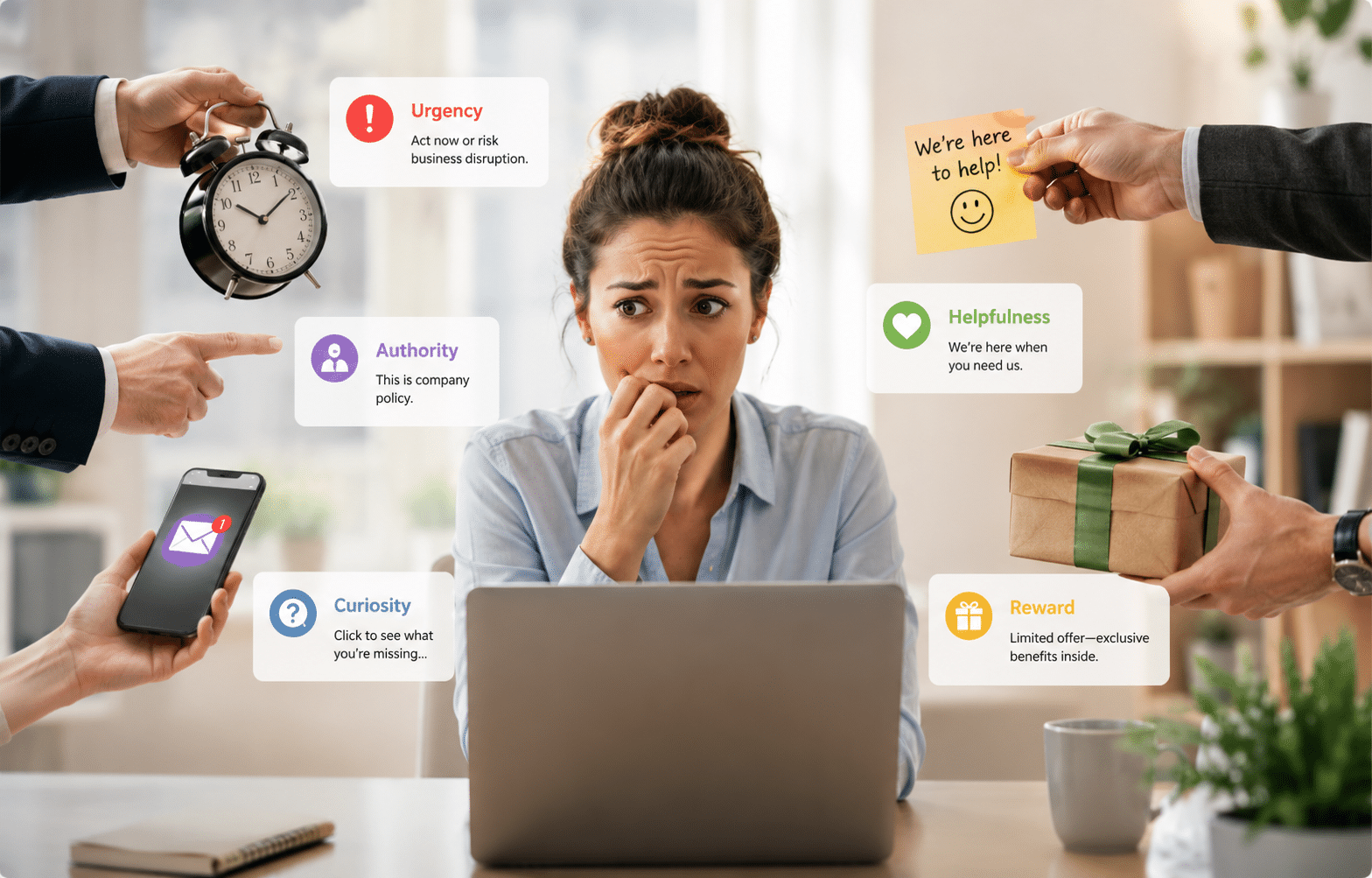
Employee experiencing urgency, authority, curiosity, helpfulness and reward pressure during a cyber attack
Attackers often use urgency, authority, curiosity, helpfulness and reward to make an unusual request feel believable.
Risk zone 02

Email, phone and communication channels

Communication tools create speed and convenience, but they also allow criminals to arrive inside ordinary conversations and familiar workflows.

06

Phishing emails

Fake messages imitate Microsoft 365, delivery companies, banks, regulators, customers or internal colleagues.

Reduce the exposure: Open important services through known bookmarks or official apps rather than unexpected links.

07

Business email compromise

A criminal compromises a real mailbox or creates a similar-looking address, then impersonates an executive, employee, customer or supplier.

Reduce the exposure: Protect email with MFA and verify financial or account changes independently.

08

Phone calls and voice impersonation

Caller ID can be spoofed, and AI-generated voices can make an impersonation more convincing.

Reduce the exposure: End the call and reconnect using a trusted number already held by the business.

09

SMS and messaging platforms

Text messages, WhatsApp, Teams, Slack and social messaging can feel more immediate and informal than email.

Reduce the exposure: Keep approvals in documented business systems and verify sudden channel changes.

10

QR codes and shortened links

QR codes hide the destination until they are scanned and may lead to fraudulent login or payment pages.

Reduce the exposure: Check the destination before proceeding and avoid entering credentials after an unexpected scan.

Risk zone 03

Identity, accounts and permissions

Once a criminal has working credentials or excessive access, they may be able to enter quietly, monitor conversations and impersonate trusted users.

11

Reused or weak passwords

Credentials exposed in one breach are commonly tested against other business and personal services.

Reduce the exposure: Use a password manager and a unique passphrase for every important account.

12

Missing or weak MFA

Where MFA is missing, inconsistent or based on easily intercepted methods, stolen passwords may provide direct access.

Reduce the exposure: Enforce MFA across email, cloud services, remote access and administrator accounts.

13

MFA fatigue and approval prompts

Criminals may repeatedly trigger prompts until a frustrated employee approves one or responds to a fake IT support call.

Reduce the exposure: Reject unexpected prompts and report repeated authentication requests immediately.

14

Shared accounts and credentials

Shared logins reduce accountability and encourage passwords to be stored in browsers, documents or chat threads.

Reduce the exposure: Give each user an individual account and use controlled delegation.

15

Excessive and dormant access

Former staff, old contractors, unused service accounts and excessive permissions increase the number of pathways into systems.

Reduce the exposure: Review permissions regularly and remove access promptly when roles change.

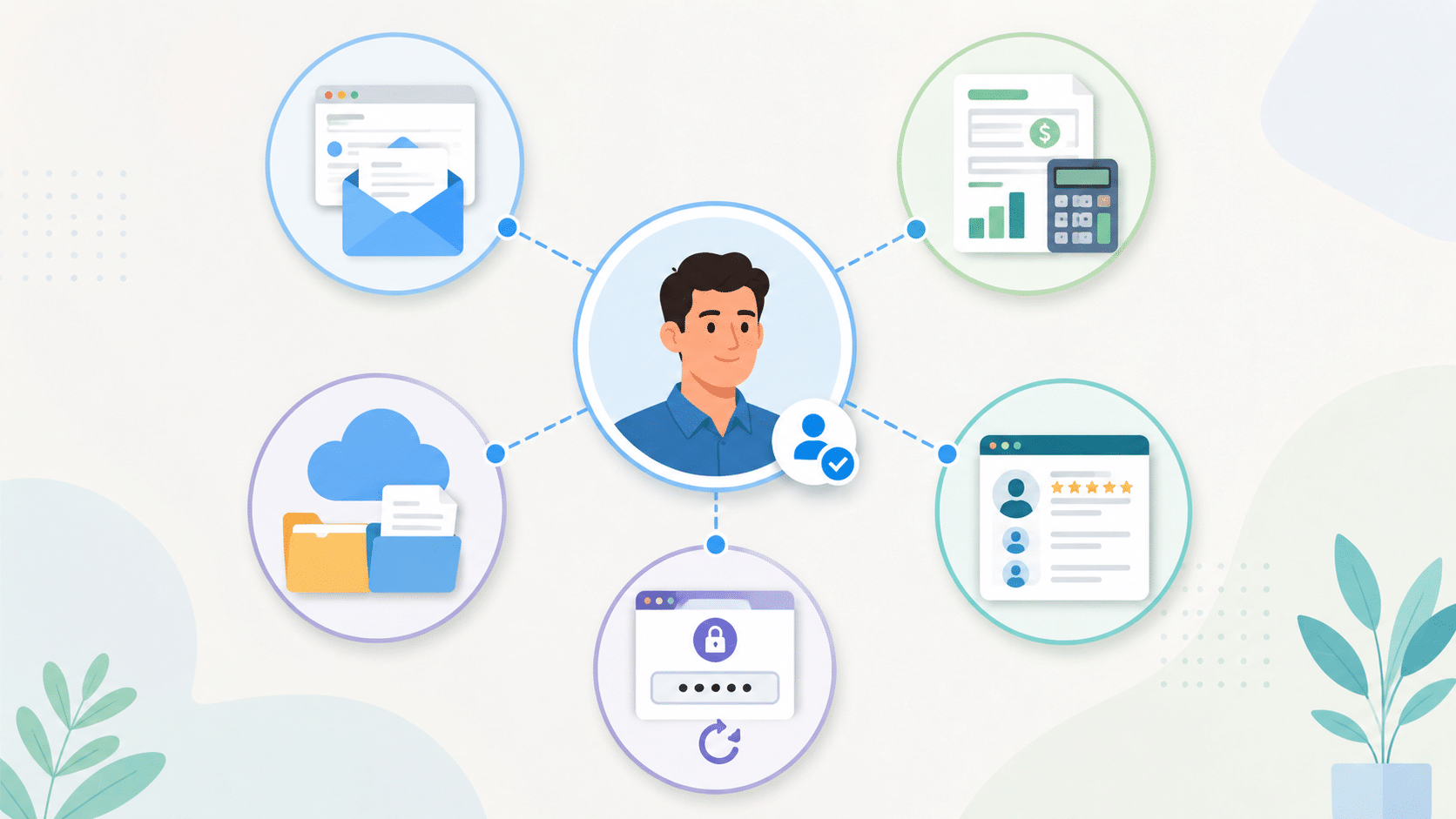
One business identity connected to email, accounting, cloud storage, payroll, CRM and remote access
One compromised identity can provide access to several connected business systems.
Risk zone 04

Devices, remote work and the physical workplace

Business systems are accessed from offices, homes, vehicles, hotels and mobile devices. Every endpoint and location can affect how safely information is handled.

16

Unmanaged laptops and desktops

Devices without consistent updates, protection, monitoring or encryption may provide an easier route into accounts and data.

Reduce the exposure: Maintain a device list and apply consistent patching, security and monitoring.

17

Mobile phones and BYOD

Phones hold email, authentication apps, client messages, cloud files and saved passwords.

Reduce the exposure: Require screen locks, updates, encryption and controlled business data access.

18

Unpatched software and old systems

Unsupported software and delayed updates leave known weaknesses available for exploitation.

Reduce the exposure: Track critical software, apply updates promptly and plan replacements before support ends.

19

Remote access and support tools

Poorly controlled remote access tools may provide broad entry from outside the workplace.

Reduce the exposure: Limit approved tools, use MFA and monitor who can connect and when.

20

Physical access and unattended information

Unlocked screens, visitor access, printed documents and discarded devices can expose information without an online attack.

Reduce the exposure: Use screen locking, visitor controls, secure disposal and clear-desk practices.

Risk zone 05

Cloud services, suppliers and public digital presence

A business depends on more than its own technology. Suppliers, websites, cloud platforms, advertising and public branding all create connections criminals may imitate or exploit.

21

Cloud configuration gaps

External sharing, administrator access, retention, alerts and third-party connections need active management.

Reduce the exposure: Review cloud settings, privileged roles, sharing permissions and security alerts.

22

Local suppliers and third-party access

Accountants, bookkeepers, contractors, software providers, marketing agencies and IT suppliers may hold credentials or access business information. A weakness in their environment can affect yours, even when the relationship is trusted and long-standing.

Reduce the exposure: Record supplier access, limit it to what is required and remove it when the engagement or project ends.

23

Fake websites and search advertisements

Fraudulent support numbers, banking pages, downloads and supplier websites can appear above legitimate results.

Reduce the exposure: Use saved official links and verify domain names before signing in.

24

Brand and social media impersonation

Fake profiles, pages and advertisements may be used to deceive customers, recruit staff or collect payments.

Reduce the exposure: Monitor key platforms and make official contact points clear.

25

AI-generated content and deepfakes

AI can produce convincing voices, videos, documents, websites and messages at scale.

Reduce the exposure: Verify sensitive requests through established processes rather than appearance alone.

Small business connected to customers, suppliers, cloud services, remote workers, banks, payments and IT providers
A small business cyber environment extends across customers, suppliers, cloud services, payments and external providers.
Risk zone 06

Payments, staff processes, data and recovery

The most damaging incidents often intersect with high-value business processes such as payments, payroll, recruitment, sensitive information and recovery.

26

Supplier invoice and payment redirection

A criminal may send an expected invoice with altered bank details or insert themselves into a genuine supplier conversation. Familiar names, local businesses and long-standing relationships can make the request feel safe.

Reduce the exposure: Confirm new or changed payment details using a trusted phone number already held by the business, not the number included in the change request.

27

Payroll and employee detail changes

Attackers impersonate employees and request that salary payments or personal details be changed.

Reduce the exposure: Verify payroll changes directly with the employee through a known contact method.

28

Recruitment and onboarding

Fake applicants and recruiters may collect personal information, introduce malicious files or gain access to systems.

Reduce the exposure: Validate recruiters and applicants, scan files and stage access during onboarding.

29

Exposed or poorly handled data

Customer, employee and breach information can help criminals personalise future attacks.

Reduce the exposure: Know where sensitive data lives, who can access it and how it is shared.

30

Backup and response uncertainty

If the business does not know what is backed up, how recovery works or who leads the response, disruption can continue longer.

Reduce the exposure: Maintain tested backups, documented contacts and a practical incident response process.

How an attack develops

A technical incident often begins as an ordinary human moment.

Strong cybersecurity places several opportunities to stop an attack between the first contact and the final impact.

1. Observe The attacker studies roles, suppliers, public profiles, routines or exposed data.
2. Impersonate They pose as someone the employee recognises, respects or expects.
3. Apply pressure Urgency, fear, secrecy, reward or helpfulness reduces verification.
4. Gain access The employee clicks, pays, approves, shares, installs or signs in.
5. Expand impact The attacker steals data, redirects money or interrupts operations.
Mid North Coast small business checklist

What should a local small business review first?

Thirty attack surfaces can feel like a large problem, particularly for a business without an internal IT or cybersecurity team. The practical response is not to fix everything in one day. Start with controls that reduce risk across several areas at once.

Protect important accounts with MFA Prioritise email, cloud systems, remote access, accounting and administrator accounts.
Use individual accounts Remove shared logins and give users only the access required for their role.
Verify payment changes Call a trusted number before changing supplier or employee bank details.
Manage and update devices Keep laptops, desktops and mobile devices supported, patched and monitored.
Create a simple reporting path Staff should know exactly who to contact when something looks unusual.
Review suppliers and external access Record who can access business systems and remove unnecessary access.
Know where sensitive information lives Review how customer, employee and financial information is stored and shared.
Confirm backup coverage Check what is protected, how often and how restoration will work.
Supporting Mid North Coast small businesses

The goal is not to blame people. It is to design safer business decisions.

Employees will continue to answer calls, open documents, approve work, help customers and respond to managers. Those activities are part of running a successful small business.

The Beach Geek™ helps small businesses across the Mid North Coast understand where people are being asked to make high-risk decisions, where technology may be creating unnecessary exposure and which practical controls will make the biggest difference.

The focus is not to begin with a list of products. It is to understand how the business operates, identify the most important risks and build a practical roadmap across accounts, devices, data, suppliers, backups and staff processes.

From reactive to resilient

A resilient Mid North Coast business assumes that suspicious messages and human mistakes will sometimes occur. It then creates layers that make those events easier to detect, contain and recover from.

Understand the local business processes criminals are most likely to exploit.
Protect identities, devices, cloud services and critical information.
Create clear verification and escalation pathways for staff.
Monitor for suspicious behaviour and unexpected changes.
Prepare tested backups and a practical incident response plan.
Common questions

Mid North Coast small business cyber risk FAQs

What cyber risks commonly affect small businesses on the Mid North Coast?

Common risks include phishing, business email compromise, invoice redirection, weak passwords, missing multi-factor authentication, supplier impersonation, unpatched devices, excessive account access and uncertain backup coverage. These risks affect regional businesses just as they affect organisations in major cities.

What is a cyber attack surface?

A cyber attack surface is any person, account, device, system, supplier, communication channel or business process that could be used to gain access, steal information, redirect money or interrupt operations.

Are employees the biggest cybersecurity weakness?

People are frequently targeted because they make decisions and operate business processes. Risk increases when staff are placed under pressure without clear verification processes, technical safeguards or a simple reporting path.

Which attack surfaces should a small business address first?

Most businesses should begin with email security, MFA, payment verification, device updates, account access, reliable backups and a clear process for reporting suspicious activity.

How is AI changing cyber scams?

AI helps criminals create more convincing messages, voices, images, websites and documents. Sensitive requests should be verified through established processes rather than appearance alone.

Can technology prevent every human mistake?

No single tool can prevent every mistake. The practical approach combines safer processes, staff awareness, MFA, managed devices, restricted access, monitoring, backups and response planning.

What is a practical first step for a Mid North Coast small business?

Start by reviewing your current position across accounts, devices, cloud systems, backups, payment processes, supplier access and staff reporting. A simple cyber readiness check can help identify which areas deserve attention first.

A practical next step for Mid North Coast businesses

You do not need to solve all 30 attack surfaces at once.

Start by understanding where your small business is most exposed, which decisions carry the greatest risk and which improvements will provide protection across several areas at the same time.

Begin with visibility My Cyber Check provides an initial view of your business cyber resilience across key areas. It can help Mid North Coast small businesses identify where stronger controls, clearer processes or deeper review may be needed.